

You can get a WordPress blog online in one afternoon for about ₹3,300 to ₹6,700 upfront, on Hostinger’s 48-month Single or Premium plan (checked 5 November 2026). Setup is the easy part.
Writing your first 30 useful posts is where most blogs quietly die.
This guide is for beginners, many of you in India, who want a blog that earns through affiliate links, ads or your own products. Just want an online diary? A free platform is enough.
We run Affgem’s blog on WordPress ourselves. The screenshots come from our own setup walkthrough in 2025, and every price below was re-checked on the vendors’ pricing pages in November 2026.
Quick answer: pick a topic you can write 50 posts about, buy hosting with a domain, install WordPress, use a free lightweight theme, and publish 2 posts a week for six months before judging results.
- Best for: people who want to earn from a blog and can give it 5 to 8 hours a week.
- Skip it if: you want money this month. Blogs are slow; a freelance gig pays faster.
- Our pick for most beginners: self-hosted WordPress on a budget host, with a free theme like Blocksy, Astra or GeneratePress.

How Much Does It Cost to Start a Blog in India?
Less than a phone recharge plan per month, if you pay for the long term upfront. The catch is the renewal price, which most hosting ads keep in small print.
| Route | What you pay | Renews at | Good for |
|---|---|---|---|
| WordPress.com Free | ₹0 | Free | Testing whether you’ll keep writing. Free sites show WordPress.com ads. |
| WordPress.com Personal | US$4/mo, billed yearly | Same plan price | A custom domain and plugins without managing hosting. |
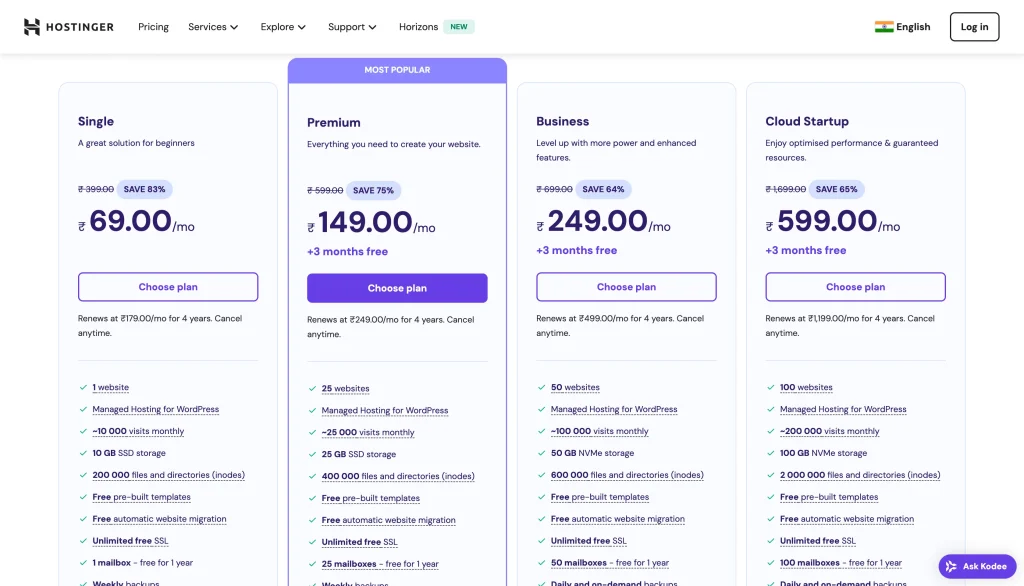
| Hostinger Single (48 months) | ₹69/mo, ₹3,312 upfront | ₹289/mo | One blog on a tight budget. Check the cart for domain terms. |
| Hostinger Premium (48 months) | ₹139/mo, ₹6,672 upfront | ₹449/mo | Most beginners. Domain free for the first year, up to 3 sites. |
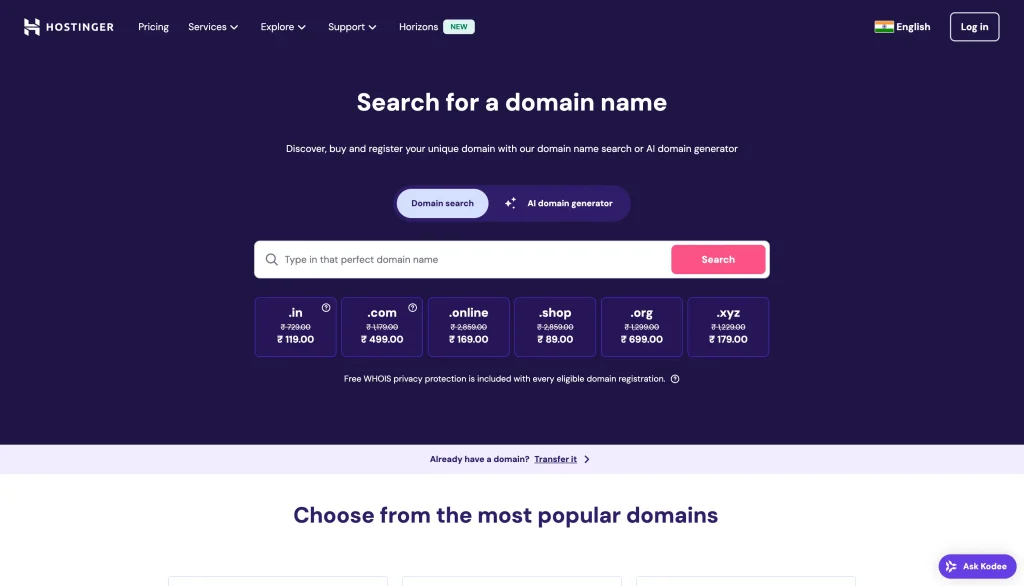
A domain is the other cost. Hostinger’s domain search showed a .com at ₹1 for the first year on a 3-year term, against a regular ₹1,499 a year. A theme and the plugins you need can all be free.
If you want to compare more hosts before you pay, our roundup of the cheapest WordPress hosting plans lines them up side by side. For a direct India head-to-head on two popular hosts, read Hostinger vs GoDaddy.
Our take: don’t pick a plan for the lowest monthly number alone. The 48-month plan is cheapest per month, but that’s ₹3,000 to ₹7,000 today for an untested hobby. Unsure? Try WordPress.com Free first. Our guide on how to start a blog for free compares Blogger, WordPress.com and Substack.
Step 1: Pick a Niche You Can Write 50 Posts About
Your niche is the topic your blog covers. Here’s the test we use: can you list 50 post titles right now without Googling? If you stall at 12, the topic is too narrow or you’re not interested enough.
Good beginner niches sit where three things overlap:
- You know it or are learning it: your job, a hobby, an exam you cleared, a city you know well.
- People search for it: type a few questions into Google and look at the autocomplete suggestions.
- Someone sells something for it: software, courses, gear or services you could recommend later.
A personal blog about “everything” is fine as a creative outlet. It’s hard to grow, though, because Google and readers can’t tell what you’re for.
Choosing a Blog Name and Domain
Keep it short, easy to spell after hearing it once, and free of hyphens or numbers. A .com is still the safest choice; .in works well if your readers are mostly in India.
Stuck? Looka’s business name generator throws out ideas from a keyword, and you can check whether the domain is free before you get attached to it.
Don’t spend a week on the name. Affgem isn’t a dictionary word, and that’s fine. What people remember is whether your posts helped.
Step 2: Get Hosting and a Domain
Hosting is the server that stores your blog and shows it to visitors. You need three things: a domain, hosting, and WordPress installed on that hosting. Most budget hosts sell all three in one checkout.
We use Hostinger in this walkthrough because its India pricing is low, it offers a 30-day money-back guarantee, and WordPress installs in a few clicks. Our Hostinger review with renewal prices and plan limits goes deeper if you want the full picture first.
Through our link, Hostinger’s referral page showed an extra 20% off the first term when we checked.
Prefer to keep your domain separate from your host? You can register it at Namecheap and point it to any hosting later. It’s one extra step, and some people like the flexibility when they switch hosts.
Buying Hostinger Hosting, Step by Step
- Open Hostinger’s web hosting plans and choose Premium if you want the domain included. Single is cheaper, but Hostinger’s FAQ excludes it from the free-domain offer, so check the cart.
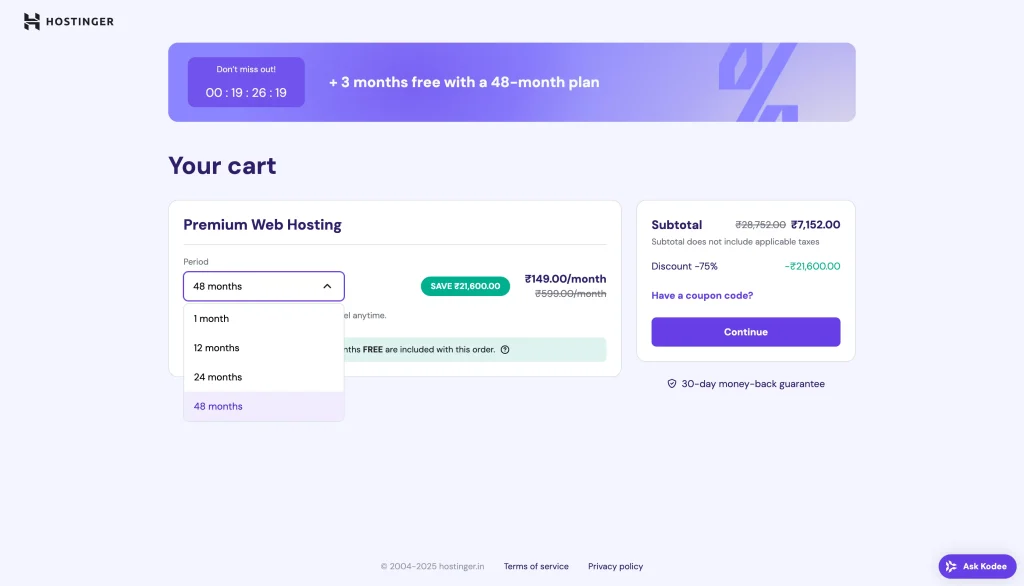
- Pick the term in the cart. The 48-month term has the lowest monthly price, and every term renews at the higher regular price.
- Search for your domain name in the cart and claim it, or choose to connect a domain you already own.
- Create your account, pay, and wait for the confirmation email.
- In the Hostinger panel, follow the setup prompt and choose WordPress. Set your admin username and a strong password.
Real-world tip: set a calendar reminder 30 days before your term ends. That’s when you decide whether to renew, switch plans or move hosts, instead of finding an auto-renewal at the regular price on your card.
Later, hosting is also something you can recommend to readers. Many hosts run affiliate programs, and our list of hosting affiliate programs worth joining covers the terms.
Step 3: Set Up WordPress, a Theme and a Few Plugins
Log in at yourdomain.com/wp-admin. Before you write anything, spend 15 minutes on four settings. Changing some of them later breaks links.
- Settings → General: site title and tagline. Keep the tagline plain; many themes show it in the header.
- Settings → Permalinks: choose Post name, so URLs read like yourblog.com/start-a-blog/. WordPress explains the options in its permalinks documentation.
- Settings → General → Timezone: set your city (Kolkata for IST) so scheduled posts go out on time.
- Posts: delete the sample “Hello world!” post and the sample page.


Choose a Free, Lightweight Theme
Design matters far less than beginners think. Readers forgive a plain blog; they don’t forgive a slow one. Pick a free theme, set your colours and logo, and get back to writing.
Three free themes we’d start with, all in the WordPress.org directory:
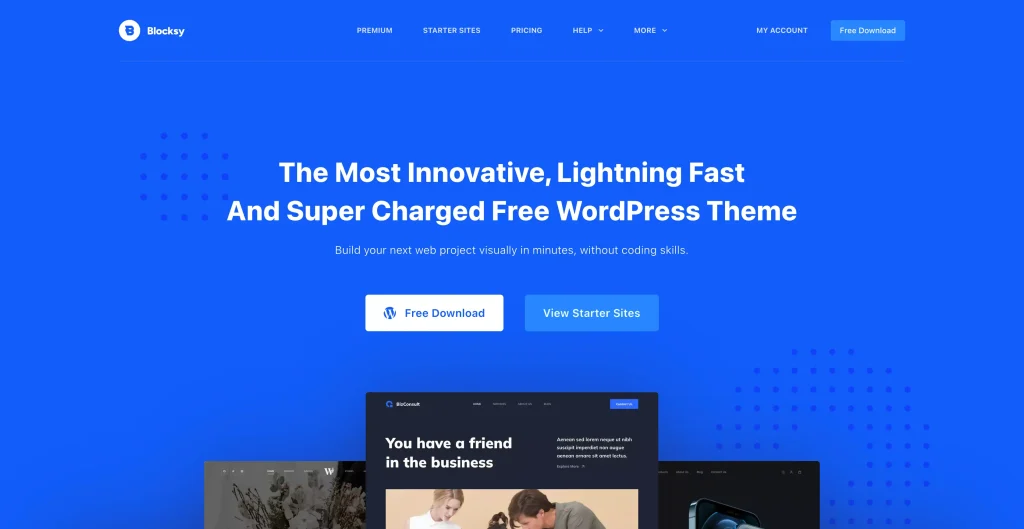
- Blocksy: what Affgem’s blog runs on. Clean layouts and a generous free version.
- Astra: lots of starter templates. Astra Pro is $99 for the first year and renews at $149.
- GeneratePress: very light and stable. The paid GeneratePress One plan is $99 a year for one site.
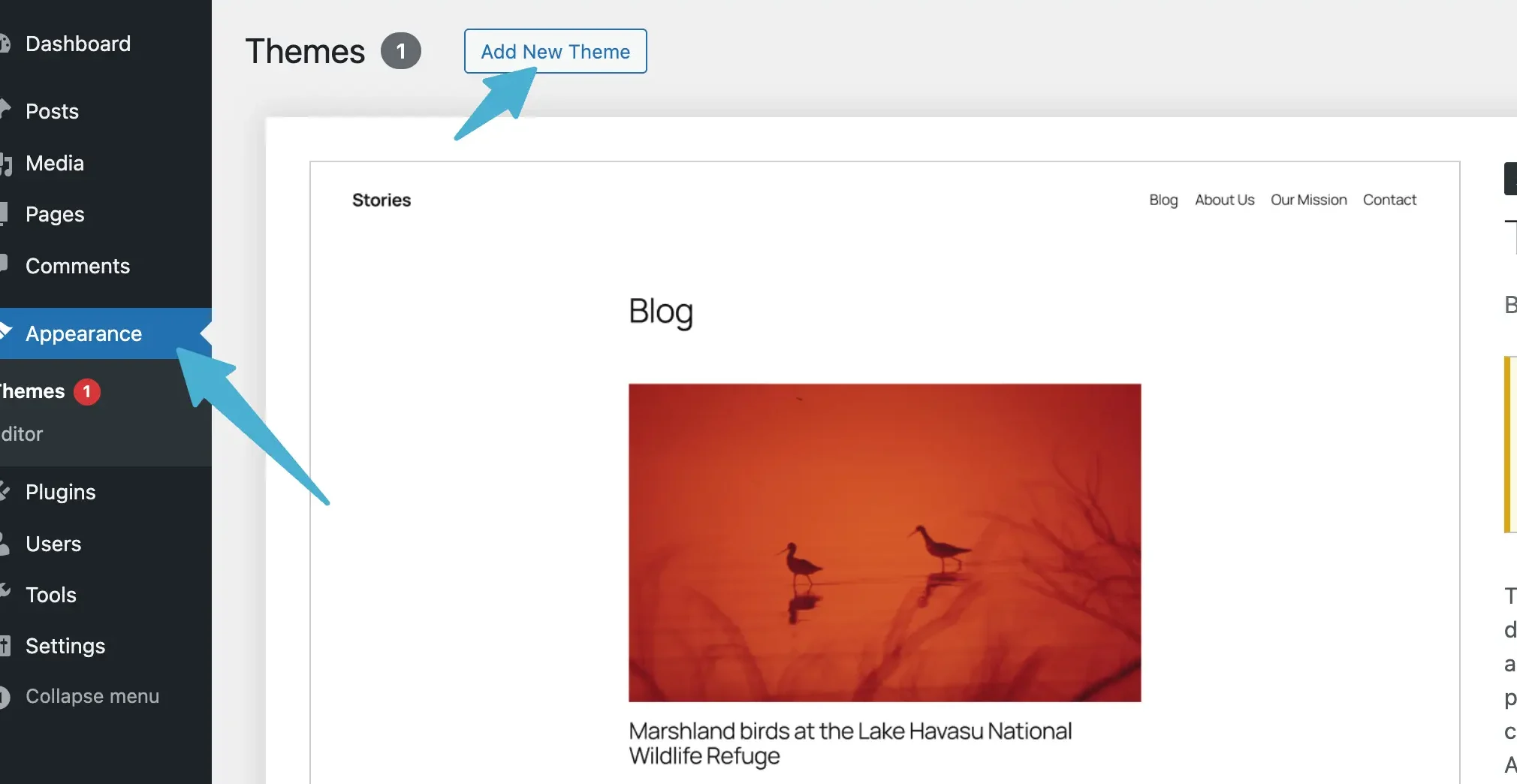
To install one, go to Appearance → Themes → Add New Theme, search the name, then click Install and Activate.
Need a logo? A text logo in a clean font is fine for year one. If you want something more polished, Looka’s logo maker sells one-time logo packages and an annual brand kit.
Pricing for the paid theme plans is from Astra and GeneratePress, checked 5 November 2026. You don’t need either to start.
Install Five Plugins, Not Twenty
Every plugin is more code to update and one more thing that can break. A new blog needs very few:
- An SEO plugin such as Rank Math or Yoast, for titles, meta descriptions and sitemaps.
- A caching plugin. On Hostinger, LiteSpeed Cache is the natural fit because its servers use LiteSpeed.
- A backup plugin such as UpdraftPlus, in addition to whatever your host keeps.
- An anti-spam plugin for comments, like Akismet.
- A contact form, because brands and readers will want to reach you.
Check your speed with Google’s PageSpeed Insights once the theme and plugins are in. If mobile scores tank after a plugin, that plugin goes.
Step 4: Write Your First 10 Posts
This is where the blog is made. Your first posts don’t need to be perfect. They need to answer one specific question each, better than the page currently ranking for it.
A simple plan for the first 10:
- 6 how-to or answer posts on narrow questions in your niche, such as “how to clean a DSLR sensor at home” rather than “photography tips”.
- 2 comparison or “best” posts for things you’ve used. These are the posts that later earn affiliate commissions.
- 2 opinion or experience posts that only you could write: a mistake you made, a result you got, a strong view.
For topics, start with Google autocomplete and the “People also ask” box. When you’re ready for numbers, here are the keyword research tools we compared for affiliate sites.
What a Good Blog Post Looks Like
- A title that promises one thing and keeps the promise.
- The answer in the first 100 words. Don’t make readers scroll past your life story.
- Headings readers can skim, short paragraphs, and a screenshot or photo where it helps.
- Links to your other posts where the topic comes up, so readers and Google find them.
- A clear next step at the end: a related post, a tool, or your newsletter.
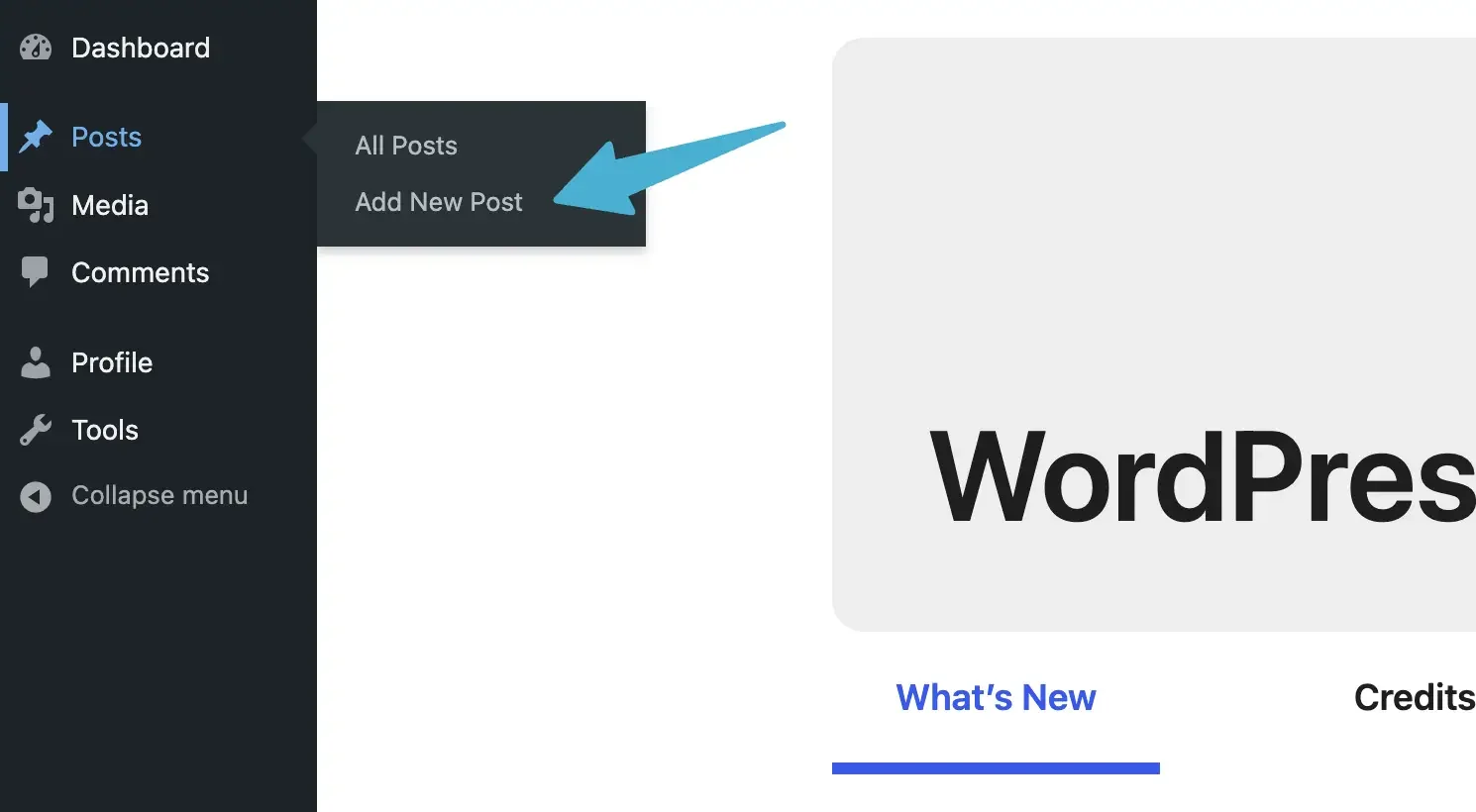
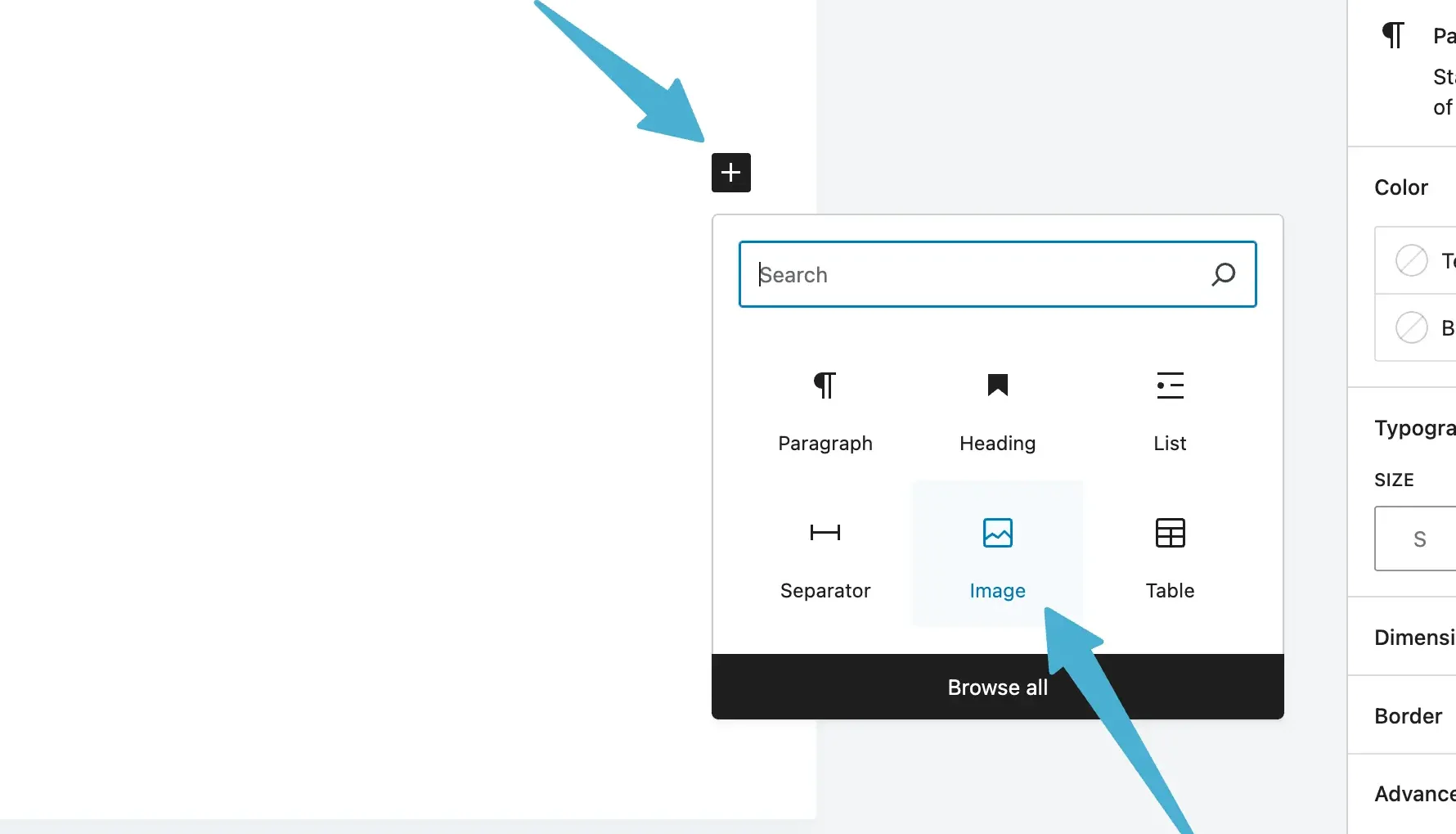
To publish, go to Posts → Add New Post, type your title and text, add images with the + button, then click Publish.
Warning: publishing 50 AI-written posts in a week is the fastest way to a blog nobody reads. Use AI to outline or tidy your drafts, but add what you’ve actually seen, tried or measured. That’s what readers reward. Our guide on how to make money using ChatGPT without mass-producing posts shows where AI fits.
Step 5: Get Your First Readers
Expect Google to ignore a new blog for a while. That’s normal, so plan for a few traffic sources from the start:
- Google Search: add your site to Google Search Console on day one and submit your sitemap. It’s free and shows which searches find you.
- One social platform: pick the one your readers use. Pinterest for recipes, crafts and travel; LinkedIn for career and B2B; Instagram or YouTube Shorts for visual topics.
- Communities: answer questions on Reddit, Quora or niche forums, and link a post only when it really answers the question.
- Email: add a signup form early. Ten subscribers who open every email are worth more than a thousand random visits.
We’ve listed more free traffic sources beyond Google, with what each one is good for.
One SEO habit pays off more than any plugin: update your best posts. Once a post gets impressions in Search Console, improve it, add what’s missing, and fix anything that’s out of date.
How Do New Blogs Actually Make Money?
Slowly, and usually from one of three places. We’re not going to promise a monthly figure, because it depends on your niche, traffic and effort, and anyone who promises you one is selling a course.

Affiliate Marketing
You recommend a product, link to it with a tracking link, and earn a commission when someone buys. It’s the most common first income for bloggers because it works on small traffic if the posts target buyers.
Start with programs that match your niche. Our list of affiliate programs for digital marketers is a good place to browse. If you review physical products, read how Amazon Associates works for new blogs before you apply.
Display and Native Ads
Ads pay per view or click, so they only add up with traffic. Google’s AdSense eligibility rules are the first hurdle. Later you can compare native ad networks for publishers as well.
Most display ads are priced per thousand impressions, so it’s worth learning how CPM pricing works before you judge any network’s offer.
Your Own Products or Services
Ebooks, templates, courses, coaching or freelance work. You keep most of the money, and a blog with a small loyal audience can sell these long before ads pay anything. Here’s our guide to selling your own digital products.
Quick verdict: plan for affiliate links first, your own product second, and ads last. Ads need the most traffic and pay the least per reader.
Mistakes That Stall New Blogs

- Spending week one on design. A logo and colour palette won’t bring a single reader. Ten posts will.
- Writing about everything. Five topics with three posts each look like a blog that doesn’t know what it is.
- Posting in bursts. Ten posts in January and none until April is worse than two a week, every week.
- Ignoring renewal dates. Your hosting price jumps at renewal. Budget for it from day one.
- Quitting at month three. Search traffic often looks flat for months before it moves. Judge the blog at month six, not month three.
- Not backing up. One bad plugin update can take a site down. Keep a backup you’ve actually tested restoring.
Questions New Bloggers Ask
Can I Start a Blog for Free?
Yes. WordPress.com and Blogger both have free plans, and they’re fine for testing whether you enjoy writing. The trade-offs are a subdomain address, limited control, and on WordPress.com’s free plan, ads you don’t earn from. Move to your own domain and hosting once you plan to monetize.
Which Hostinger Plan Should a New Blogger Pick?
Premium suits most beginners because it includes a domain free for the first year and room for up to three sites. Single is cheaper and works for one blog, but Hostinger’s FAQ excludes it from the free domain offer. Check the renewal price on the plan card before you choose a 48-month term.
How Long Does It Take a Blog to Make Money?
There’s no honest fixed answer. It depends on your niche, how often you publish and whether your posts target buyers. Plan for several months of writing before the first affiliate sale, and treat any earnings in the first few months as a bonus rather than the goal.
Do I Need to Be a Good Writer to Start a Blog?
No. Clear beats clever. Write like you’d explain something to a friend, keep sentences short, and run drafts through a grammar checker. Readers come for useful answers and your real experience, not for perfect prose. You’ll also get noticeably better after your first 20 posts.
Should I Use AI to Write My Blog Posts?
Use it as an assistant, not the author. AI is handy for outlines, headline ideas and tidying grammar. Posts that are entirely AI-written tend to sound generic and add nothing new. Your own tests, photos, opinions and mistakes are what make a post worth reading and linking to.
So, Should You Start a Blog?
Yes, if you can commit to one topic and about two posts a week for six months. For most beginners in India, that means budget WordPress hosting, a free theme like Blocksy, and spare hours spent on posts, not design.
- Just testing the idea: WordPress.com Free for a month.
- Serious about earning: Hostinger Premium with the free domain, plus WordPress.
- Want your domain separate: Namecheap for the domain, any host for the site.
One warning: the cheap monthly price covers the first term only, so budget for the renewal.
Your next step is simple. Write down 50 post ideas tonight. If the list holds up, set up your Hostinger plan tomorrow and publish your first post this week.



[…] consistent, high-quality traffic to your affiliate site. Still setting up your site? Our guide on how to start a blog covers hosting, WordPress and your first […]
[…] ThirstyAffiliates is an excellent plugin for WooCommerce stores and bloggers looking to manage affiliate links efficiently. It helps cloak, organize, and track links while providing an easy-to-use interface. Bloggers who are just getting set up can follow our guide on how to start a blog. […]
[…] good customer support, this is a solid choice. If you’re setting up your first site, our guide on how to start a blog covers the full […]
[…] for a new blog, a heavy theme and uncompressed images slow you down more than the host does. Our guide to setting up a blog covers the setup choices that keep a site […]
[…] simple flat-bounty option. If your readers are setting up their first site, pair it with a guide on setting up your own blog so the recommendation has […]
[…] itself. None of these tools matter if the blog is offline. If you still need the foundation, follow how to start a blog with costs and first posts, then add […]
[…] Blogging: […]
[…] raw output. Clients spot it in two lines. If you’d rather publish on your own site, our guide to setting up a blog with costs and first posts walks through the […]
[…] then, don’t force a paid blog into a ₹0 plan. Our guide to starting a blog is there for the day you’re […]
[…] you have no audience yet, a blog is the slowest but steadiest source of buyers. We cover starting a blog with real costs and first posts step by […]
[…] cheap hosts? Our roundup of cheaper WordPress hosting options compares more names, and our guide to starting a blog with real costs and first posts covers what to do after you […]